SPY WAR: CLANDESTINE SYNDICATE
Welcome to the shadows of global intelligence. In Spy War, two rival intelligence agencies clash in a high-stakes duel for global supremacy. Direct covert operations across the globe, deploy elite field operatives, secure black-budget facilities, and outmaneuver your opponent before your network is compromised.
Unlike conventional card games, Spy War emphasizes information management, precise economic tempo, and tactical team assignments:
- True Espionage Operations: Execute lethal Assassinations, bleed enemy coffers dry with coordinated Raids, and strip classified directives through targeted Subterfuge.
- Dynamic Team Logistics: Command operatives solo or assemble strike squads to punch through heavy fortifications. Assemble defensive bodyguards in real-time to intercept and thwart incoming threats.
- Persistent Black-Market Economy: Manage floating turn capital and store unspent resources across secure safehouses and headquarters.
- Master Intelligence Directives: Race to complete top-secret table missions or execute the ultimate endgame gambit: the Global Dominion Plan.
Play against an advanced Information Set Monte Carlo Tree Search (ISMCTS) AI across 10 distinct skill levels, battle a friend locally in Pass & Play, or challenge rivals across the globe in Online Multiplayer.
📜 2. Game Rules
The Objective
The primary goal in Spy War is to secure intelligence dominance by the end of the final round (default: 5 rounds) by accumulating the highest number of Mission Points.
- Endgame Scoring: If players are tied on Mission Points after the final round, the tie is broken by Total Resource Wealth (stored coins across Affiliations and Locations plus unspent turn coins).
- Sudden Death: If a Points Threshold is enabled in match settings, the first player to reach that score immediately wins.
- Alternative Instant Victory: Successfully enact the Global Dominion Plan by satisfying all three conditions in a single turn (Eliminate an operative, Raid 4+ resources, Discard a card from hand, and pay 8 coins).
Card Types
- 🏢 Affiliation (Headquarters):
- Placed face-up at match setup.
- Generates base revenue each turn (Production) and stores unspent coins up to its storage cap (default: 5).
- Often possesses passive discounts or exhaustible special agency abilities (e.g., spawning scouts, granting skill tokens, drawing intel).
- 📍 Locations (Safehouses & Assets):
- Deployed to the battlefield to increase your resource engine.
- Exhaust to produce coins each turn and bank surplus revenue. Some provide passive card discounts or unique field buffs.
- 👤 Operatives (Field Agents):
- The backbone of your covert network. Defined by base Offense (OFF) and Defense (DEF), plus specialized skill ranks:
- 🗡️ Assassin Skill (ASS): Lethal elimination capability.
- 💰 Raid Skill (RAID): Asset seizing and resource extraction.
- 🕵️ Subterfuge Skill (SUB): Intel theft and hand disruption.
- The backbone of your covert network. Defined by base Offense (OFF) and Defense (DEF), plus specialized skill ranks:
- 💼 Support (Tactical Cards):
- Single-use strategic actions, equipment, and operations (e.g., Training, Operative Crews, Double Agents, Assassination Orders) played directly from your hand to alter combat or turn momentum.
- 🎯 Missions (Intelligence Directives):
- Shared objectives drawn to the center of the table (1 new mission revealed each round).
- Both players race to place progress tokens on these cards by executing specific mission requirements (e.g., resource theft, operative eliminations, discarding opponent hands, thwarting enemy ops, or completing diverse ops in a single turn).
The Three Covert Operations
When your operatives are in the Ready (R) state, you may exhaust them (individually or combined as a team) to launch one of three operations:
1. 🗡️ Assassination (ASS)
- Objective: Eliminate and discard an enemy operative from the battlefield.
- Attack Power: Sum of attacker(s) Offense + Assassin Skill + active stat buffs.
- Defense Power: Target operative's innate Defense + any defending bodyguards assigned to intercept.
- Resolution:
- Attacker > Defender: Target (and all defending bodyguards) are eliminated and sent to the discard pile.
- Attacker == Defender (Tie): Target is eliminated, but mutual casualties occur—both attacking and defending operatives are discarded!
- Attacker < Defender (Thwarted): Assassination fails! Defending bodyguards repel the strike, and the attacking operative(s) are eliminated.
2. 💰 Raid (RAID)
- Objective: Seize stored coins from the enemy’s Affiliation or Locations.
- Attack Power: Sum of attacker(s) Offense + Raid Skill + active stat buffs.
- Defense Power: Total defense of any assigned defending operatives.
- Resolution:
- Attacker > Defender: Successful raid! You steal 1 coin per participating attacker card + 1 additional coin per point of Raid Skill (up to target's stored balance). Defending operatives are discarded.
- Attacker == Defender (Tie): Raid thwarted. Zero coins stolen; all participating operatives (attackers and defenders) suffer mutual destruction and are discarded.
- Attacker < Defender (Thwarted): Raid repelled. Zero coins stolen; attacking operative(s) are discarded.
3. 🕵️ Subterfuge (SUB)
- Objective: Infiltrate enemy headquarters to discard cards directly from their hand.
- Attack Power: Sum of attacker(s) Offense + Subterfuge Skill + active stat buffs.
- Defense Power: Total defense of any assigned defending operatives.
- Resolution:
- Attacker > Defender: Subterfuge succeeds! Forces the opponent to discard 1 card per participating attacker card + 1 additional card per point of Subterfuge Skill. Defending operatives are discarded.
- Attacker == Defender (Tie): Subterfuge thwarted. Zero cards discarded; all participating operatives are discarded.
- Attacker < Defender (Thwarted): Subterfuge fails; attacking operatives are discarded.
🕹️ 3. How to Play (Turn Sequence)
Each round consists of two turns (one per player). A player's turn flows across three sequential phases:
code Code
[ DRAW PHASE ] ──▶ [ OPERATIONS PHASE ] ──▶ [ CLEANUP PHASE ]
Phase 1: Draw Phase
- Refresh Cards: All your cards in play (Affiliation, Locations, Operatives) automatically refresh from Exhausted (E) to Ready (R).
- Draw Intel: Draw 2 cards from your draw deck (configurable in settings).
- Hand Limit Enforcement: If your hand exceeds the maximum hand size limit (default: 5 cards), you must select and discard excess card(s) of your choice before taking further actions.
Phase 2: Operations Phase
During your Operations Phase, you can perform any combination of legal actions in any order as long as you have the resources or ready cards:
- Exhaust for Revenue: Tap your Affiliation or Locations to generate spendable turn coins.
- Deploy Cards: Spend coins to summon new Operatives, build Locations, or play tactical Support cards from your hand.
- Activate Special Abilities: Trigger unique agent skills, draw cards, siphon resources, or attach upgrade tokens (+X/+X Tech, Weapon, Suit, or Skill tokens).
- Launch Combat Operations: Select a ready operative (or team) and choose Assassinate, Raid, or Subterfuge. The opponent will then enter an interactive defense window to assign bodyguards or deploy counter-tactics.
- Pass / End Turn: Once you have completed all desired moves, click End Turn (Pass).
Phase 3: Cleanup Phase
- Temporary Buffs Expire: End-of-turn stat buffs reset to base values.
- Discard Tokens & Transient Cards: Any cards bearing "Discard at end of turn" or Discard tokens are routed to the discard pile.
- Telemetry & Objective Check: The game engine checks whether you qualified for active table missions (e.g., executing all 3 operation types, emptying your hand, eliminating operatives).
- Coin Banking: Unspent floating turn coins are automatically stored into your Affiliation and Locations round-robin up to their storage caps. Any excess beyond storage caps is discarded.
- Turn Passes: Initiative switches to the opponent, or the round counter advances if both players have played.
⚙️ 4. How to Setup the Game
You can start playing immediately with the default configuration, or customize the parameters to tailor match length and tactical depth:
Game Modes
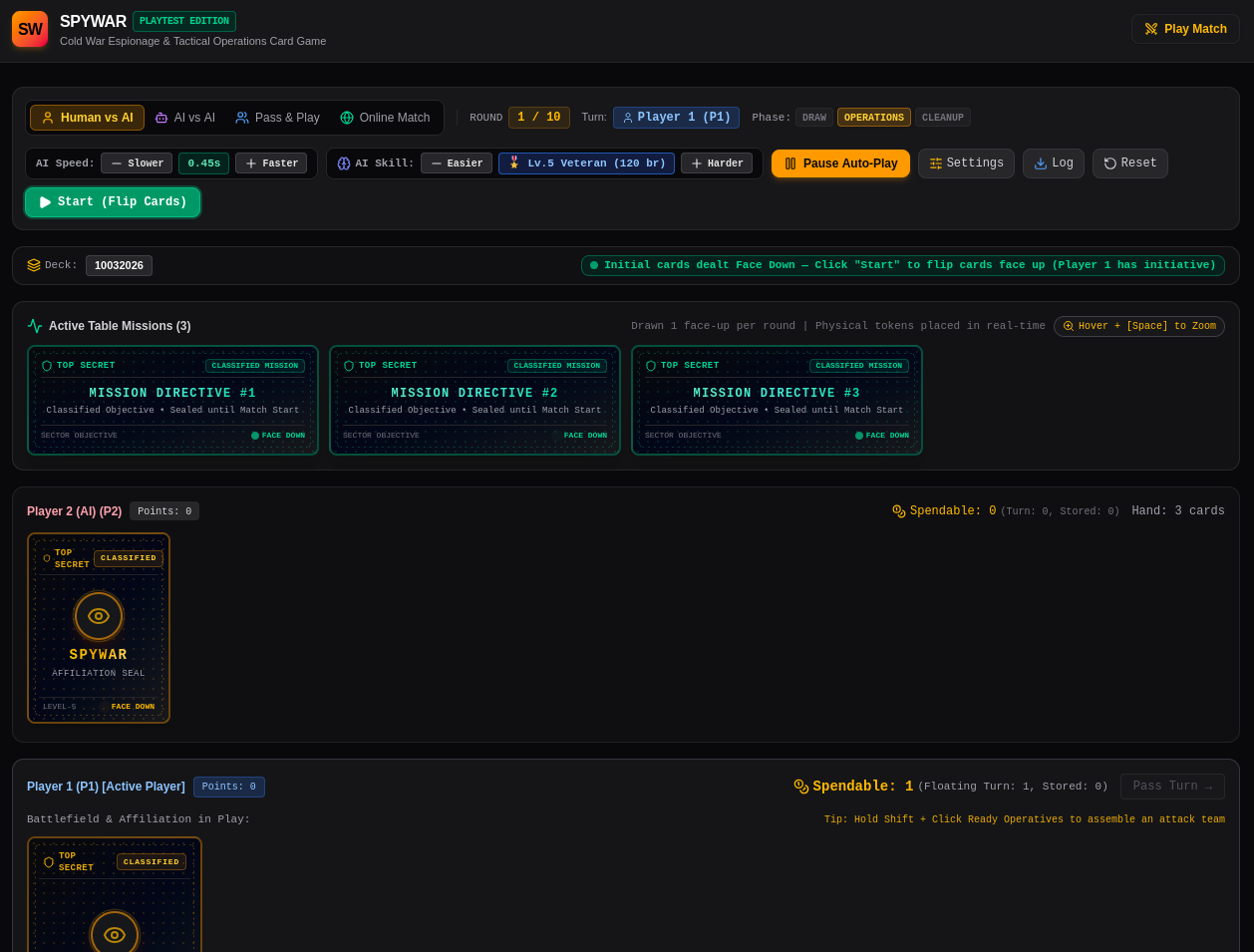
- 👤 vs 🤖 Human vs AI: Solo play against the ISMCTS agent.
- 👤 vs 👤 Pass & Play: Local two-player hotseat match on the same computer.
- 🤖 vs 🤖 AI vs AI: Spectate autonomous bots competing against each other (ideal for testing deck archetypes).
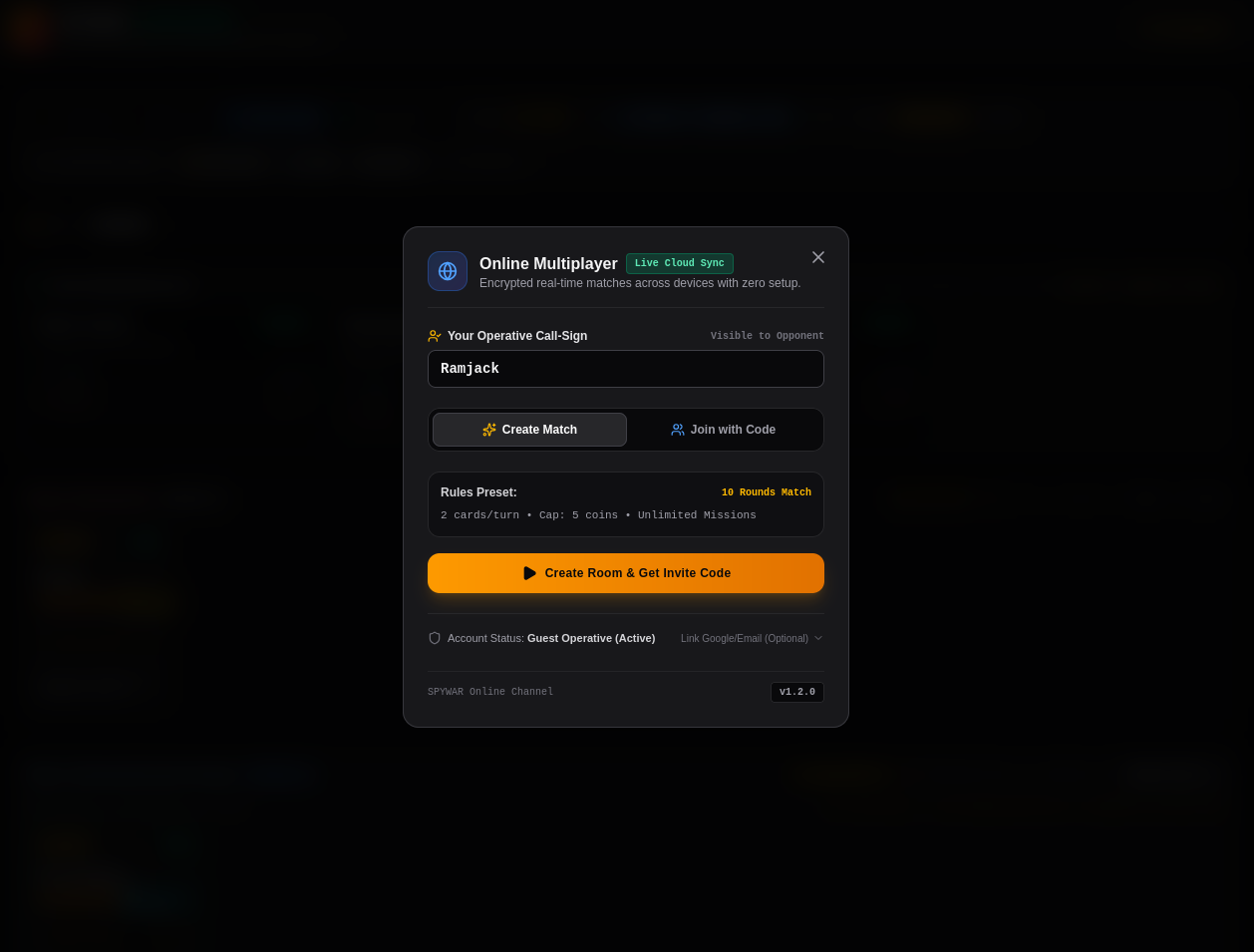
- 🌐 Online Multiplayer: Host a game room or enter a 6-character room code to challenge a friend online in real-time.
AI Difficulty Settings (ISMCTS Depth)
Adjust the AI's intelligence slider across 10 distinct tiers:
- Level 1 (Novice): 15 tree branches. Fast and casual.
- Level 5 (Veteran - Default): 120 tree branches. Solid multi-turn planning and defense anticipation.
- Level 8 (Grandmaster): 380 tree branches. Heavy search depth targeting resource starvation and board wipes.
- Level 10 (Apex Engine): 750 tree branches. Deep Monte Carlo lookahead across hidden card distributions.
Match Rules Configuration (Gear Icon ⚙️)
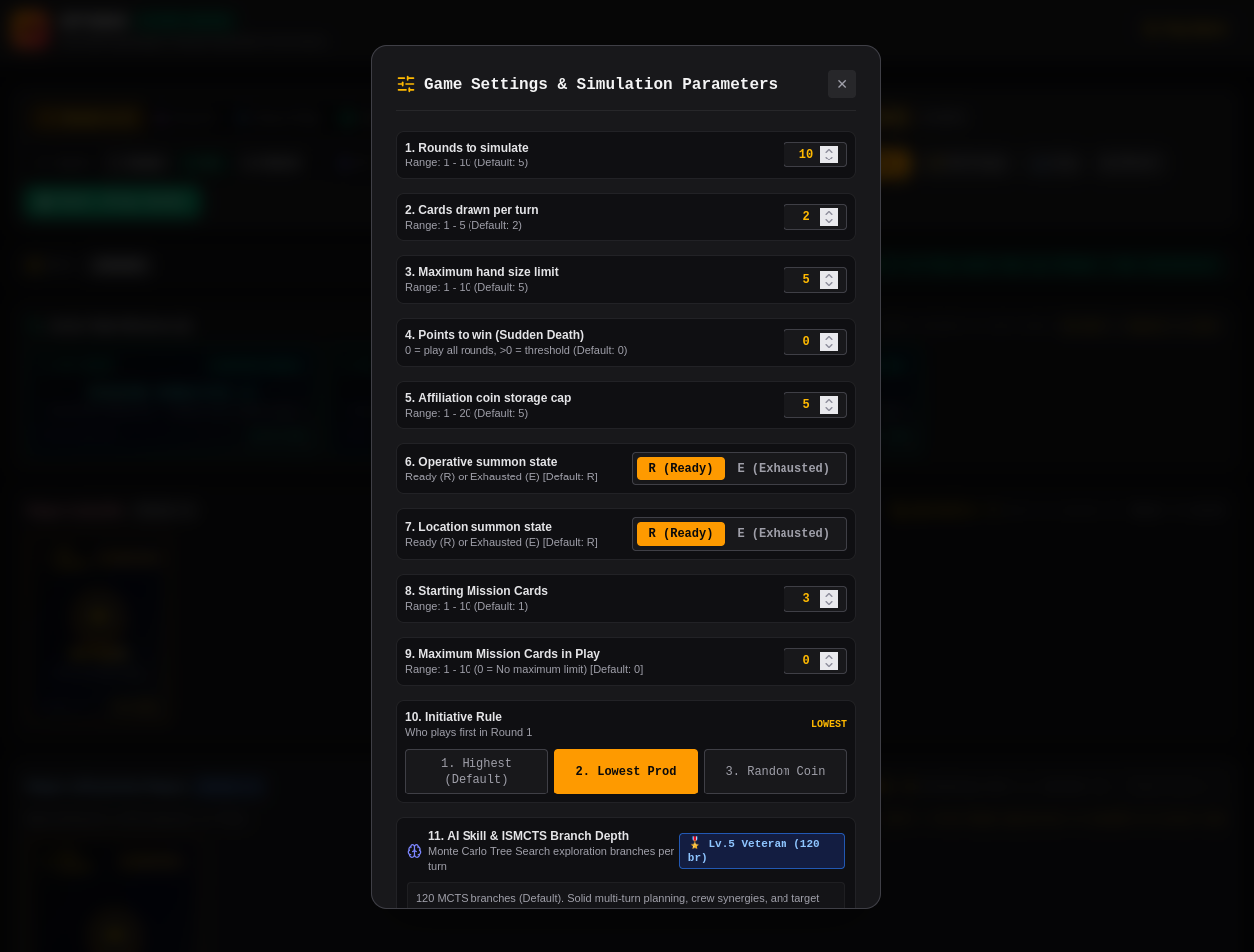
Click the Gear / Sliders icon on the top toolbar to adjust core parameters:
- Rounds to Simulate: Default is 5 rounds (range: 1 – 10).
- Cards Drawn Per Turn: Default is 2 cards (range: 1 – 5).
- Maximum Hand Size: Default is 5 cards (range: 1 – 10).
- Sudden Death Points: Default is 0 (play all rounds). Set higher (e.g., 5 or 10) to end the match the instant a score is hit.
- Affiliation Storage Cap: Maximum coins an HQ can store (default: 5).
- Summon State: Set Operatives and Locations to enter the battlefield Ready (R) or Exhausted (E).
- Initiative Rule: Choose who plays first in Round 1:
- Option 1: Highest Affiliation Production (Default)
- Option 2: Lowest Affiliation Production
- Option 3: Random Coin Flip
- Initial Card Deal: Toggle between Face Up (Standard) or Face Down (Classified Deal) where cards remain face-down until you click "Start".
🎛️ 5. Controls, Buttons, and UI Layout
Top Header Toolbar
| Button / Control | Description |
| Play Match Tab | The primary game interface where the match is conducted. |
| Game Mode Selector | Switch between Human vs AI, Pass & Play, AI vs AI, and Online Multiplayer. |
| Settings (⚙️ / Sliders) | Opens the Match Configuration modal to adjust rounds, hand limits, rules, and AI difficulty. |
| AI Speed Slider (⚡) | Adjusts AI decision animation speed from 100ms (instant) up to 1000ms. |
| Reset (↺) | Restarts the current match with a freshly shuffled deck and re-dealt hands. |
| Start Match (▶) | Initiates the match and flips cards face-up if playing in Classified mode. |
Battlefield Layout
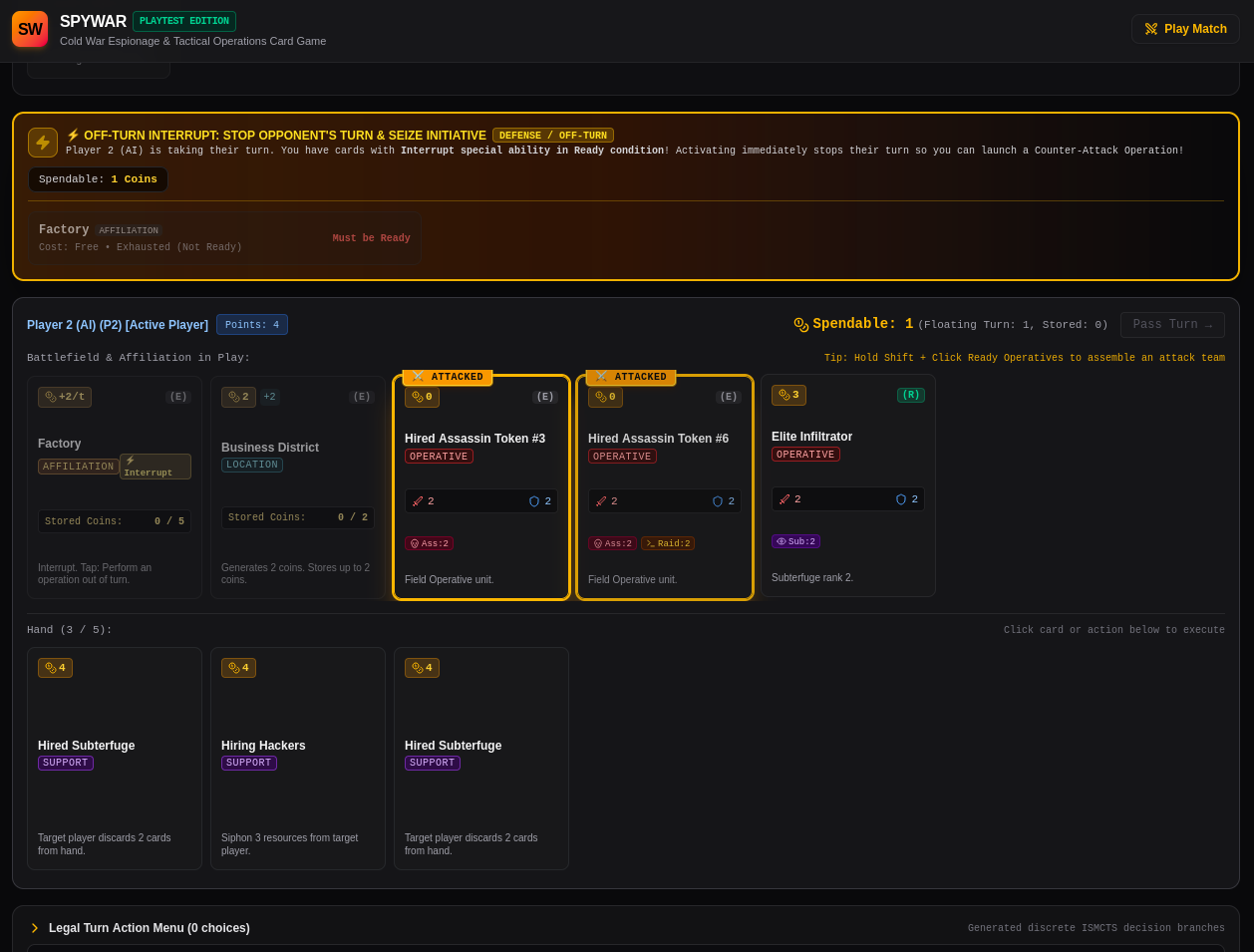
- Top Area (Opponent / AI): Displays the opponent's Affiliation HQ, active Locations, deployed Operatives, hand count, coin balances, and discard pile.
- Center Table (Active Missions): Displays the active mission cards for the current match. Live progress tokens for P1 and P2 are marked directly on the cards.
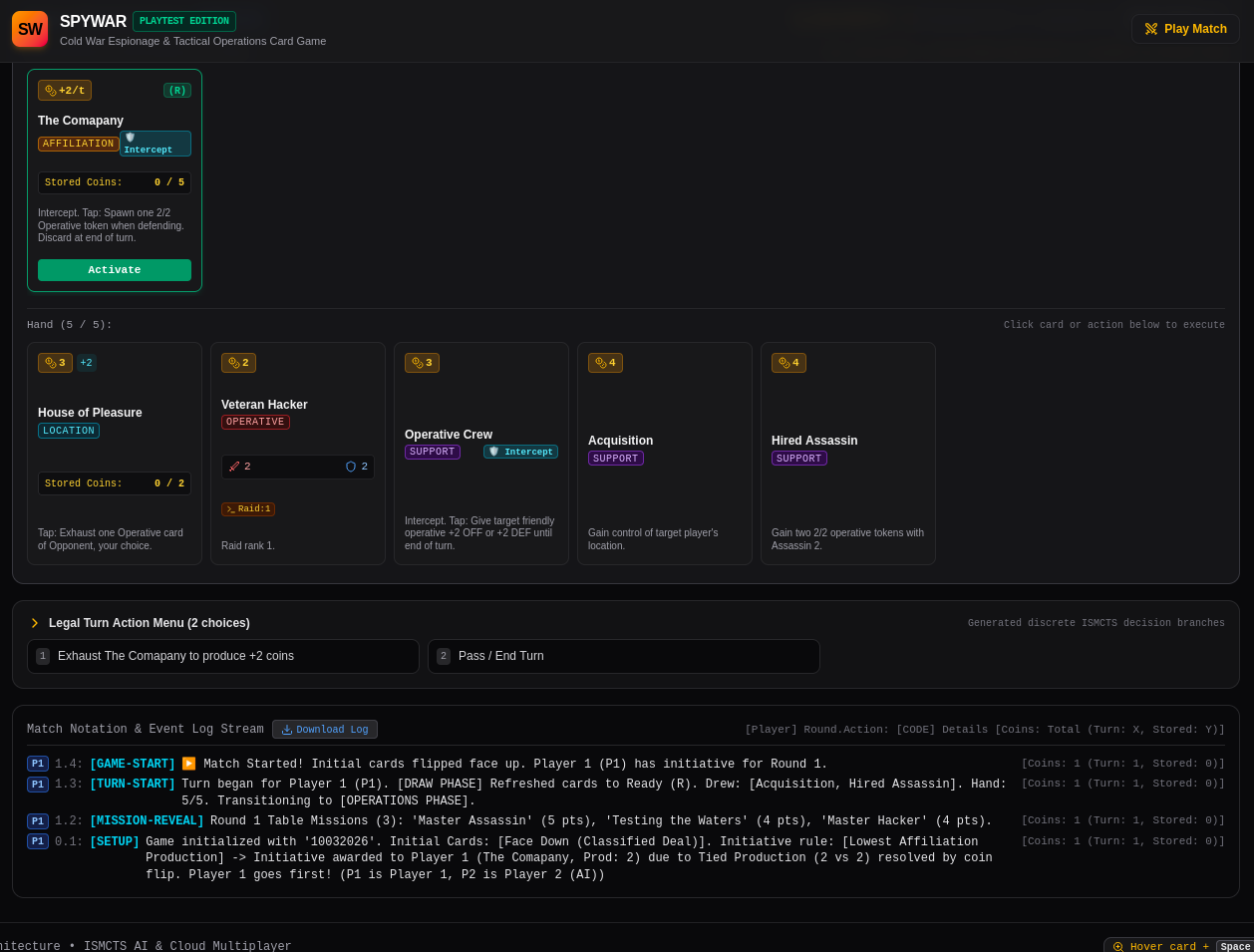
- Bottom Area (Player 1): Your active battlefield, showing your Affiliation, deployed Locations, ready Operatives, current spendable coins, and your hand of cards.
- Right Panel (Action & Battle Log): Real-time chronological telemetry feed detailing every deployment, coin produced, combat breakdown (Attacker Offense vs Defender Defense), and mission scored.
Card Interaction & Hotkeys
- Hover + [Spacebar] (Card Zoom): Hover over any card on the battlefield, hand, or mission row and press Space to open a high-resolution, full-detail inspect view with complete abilities, stats, and flavor text.
- Click a Card: Clicking any card in your hand or battlefield displays its available contextual actions (Deploy, Produce Coins, Special Abilities, or Operations).
- Combat Planner Modal: When attacking with an Operative, click the attack action to open the tactical planner:
- Select Solo Strike or checkbox Team Strike with multiple ready operatives.
- Pick the Operation Type: Assassination (🗡️), Raid (💰), or Subterfuge (🕵️).
- Click the enemy target card.
- Defensive Response Window: When attacked, an interactive panel alerts you to the incoming strike. You can select ready operative(s) as Bodyguards to absorb damage, play Operative Crew for defense buffs, or trigger instant Intercept/Interrupt reactions before confirming defense.
- End Turn / Pass Button: Ends your operations phase, triggers automatic coin banking, and passes initiative to your opponent.
💡 Quick Tips for Beginners
- Don't Forget to Produce: At the start of your turn, click your Affiliation HQ and Locations to exhaust them for coins before deploying cards.
- Team Up for Heavy Targets: A single operative might get overpowered by enemy defense. Group two or more operatives together into a Team Operation to combine their Offense and breach high-Defense targets.
- Watch the Missions: Missions provide the decisive victory points. Keep an eye on the table missions in the center and tailor your operations (e.g., raiding for coins, eliminating agents, or saving cards) to claim points first.
- Protect Your Revenue: Don't leave high-value safehouses unprotected—if your opponent has ready agents with Raid skills, they will siphon your stored reserves!
Development log
Leave a comment
Log in with itch.io to leave a comment.